Largest Contentful Paint (LCP)
LoadingTime until the biggest element in view, usually the lead photo or headline, finishes drawing. Google’s line is 2.5 seconds. Bloated images and a slow server account for most misses.

Speed Optimization
Faster pages for Yellowknife business sites, measured the way customers really meet them: on a phone, on mobile data or hotel wifi, often at the airport, in a parking lot or on a cold driveway.

On the office desktop in Yellowknife, Northwest Territories, your website probably feels fine. Customers meet it another way: for the first time, on a phone, and often outdoors. When January averages −26 °C, nobody wants to stand on a sidewalk waiting for a page to load. Think of someone just off a flight at YZF, a traveller in a hotel lobby checking tonight’s northern lights tour, or a homeowner in a chilly basement looking for furnace service. In those moments a page that seems instant on office wifi can crawl.
Many of these searches are urgent. Suggestions include “aurora forecast yellowknife tonight”, “emergency dentist yellowknife”, “yellowknife vet emergency” and “breakfast yellowknife open now”. People open two or three results and keep the one that shows them what they need first. A slow page is often abandoned before it finishes.
Tourism sites carry extra weight. Galleries of night-sky photos and video look wonderful and weigh a great deal, and the people browsing them are often overseas, comparing operators on their phones. Speed also counts with Google, whose ranking systems use loading data gathered from real Chrome visits. The aim is not a perfect lab score; it is a site that passes for real visitors on real phones.
Search demand
Speed itself never shows up in local suggestions. These Google.ca suggestions from October 2026 do: each one comes from someone short on time, choosing whichever result opens first.
Not every page needs equal attention. On most Yellowknife sites the visits that count are the urgent ones: tonight’s tour checked from a hotel, hours looked up on a cold morning, an emergency page opened in a basement. Analytics shows which pages those are, and they get the work first. Success means passing in Google’s field data from real visitors, not a perfect number in a lab test.
Common causes
Usually two or three of these turn up on the same site.
Night-sky shots, lodge interiors and project photos uploaded at several megabytes each, then displayed a few hundred pixels wide. Resizing them and converting to WebP removes most of that weight.
Background video on the home page is popular with tour and lodge sites. On a phone it can stall the rest of the page; a poster frame that plays on request is the gentler choice.
Restaurants, clinics and trades often post menus or rate sheets as PDF files. A phone must fetch the entire document before showing a word, and search engines give its contents little weight. An ordinary page solves both.
Pop-ups, chat, social feeds, booking widgets and several tracking tags, each adding requests of its own, many installed years ago and long forgotten.
If the server dawdles before sending anything back, the rest of the page queues behind it. Caching takes the edge off; sometimes only a move to a sturdier host truly solves it.
What Google measures
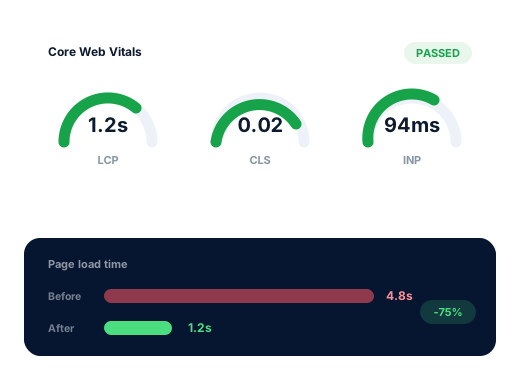
Chrome records these figures from real visits, and Google reports a rolling 28 days of them. A page passes when three visits in four, the 75th percentile, meet all three targets.
Time until the biggest element in view, usually the lead photo or headline, finishes drawing. Google’s line is 2.5 seconds. Bloated images and a slow server account for most misses.
The lag from a finger tap to a visible change on screen. Google wants it under 200 milliseconds. Live chat, carousels and piles of tracking tags tend to be behind slow results.
How far content lurches while the page assembles, the reason a thumb lands on the wrong link. Scores under 0.1 come from holding room in advance for photos, banners and late arrivals.
The work
Real-visitor and lab measurements taken for your most important pages before we change anything, so the gain can be demonstrated.
Every photo exported at the dimensions its slot really uses, squeezed down, delivered in WebP for browsers that read it, and fetched only when a reader nears it.
Photo galleries split up or loaded on request, and video replaced by a poster image until someone presses play.
Menus, rate sheets and schedules turned into light HTML that opens quickly and can be indexed.
Unused plugins removed, chat and tracking delayed until the content has loaded, and fonts served from your own site.
Page and browser caching tuned to your host, lab tests repeated after launch, and field data reviewed about a month later, once Google has a new 28-day window.
Done carefully
The standards we keep on every account, written down so you can hold us to them.
Speed helps a useful page get read. It cannot rescue a page that does not answer the question.
Google weighs page experience alongside relevance and many other signals, so faster pages are no shortcut to the top. Where speed reliably earns its cost is with the person already on the page. If an audit shows your site is quick enough, we will say so and suggest spending the money elsewhere. Speed work is a one-time quote; keeping the gains is part of routine upkeep in the monthly plans.
Ask us about your business
How we work
From the first review of your listing to a brief report each month that takes minutes to read.
Your site and listing get a close read, and we test what someone sees searching from Downtown, Range Lake, Niven Lake or Kam Lake.
Together we choose the phrases that bring paying customers and give each one a home: a page, or a change to the listing.
Listing, website, content and directory work, starting with the changes most likely to help quickly.
Every month you receive the calls, messages and rankings we measured, plus the plan for the month ahead.
Questions
Two quick tests tell you a lot. Open PageSpeed Insights, enter your home page and read the mobile field data at the top, which reflects real visitors. Then switch your phone to mobile data, close every app and load the site as a stranger would.
Google’s thresholds are a good yardstick: the largest element visible within 2.5 seconds, a response to any tap within 200 milliseconds, and a layout shift score under 0.1, all measured on phones.
Sometimes, a little. Speed rarely lifts a weak page past a strong one, but among closely matched results it can help. The surer gain is fewer people giving up before they call or book.
No. Night-sky images sell the trip. They need to be sized to the space they fill, compressed, and loaded as the visitor scrolls, with galleries opened on request rather than all at once. Handled that way, a site can keep its photography and still load quickly.
The changes themselves usually take one to two weeks on a small site. Google’s field report then needs its 28-day window to fill with new visits, so expect the pass to appear around a month later.
An audit comes first, since every slow site is slow for its own mix of reasons; the repair is then priced once, in CAD. Holding on to the gains afterwards belongs to the routine care built into all three monthly tiers, from $300 for Starter and $500 for Growth up to $700 for Pro.
Further reading
Further articles on this subject for Yellowknife business owners.
Each service stands on its own, and plenty of clients start with only one.
People in town look for each trade differently, so each industry page has research of its own.
Request a free audit showing where you appear from Downtown to Kam Lake, which competitors rank above you, and the fixes worth making first.
Send me the free audit